Fault description
Customer IBM x3650 M5 server is down.
Reboot the machine found that it could not start normally, logged into the IMM to check event log, found that DIMM16 reported an error,
initially judged that the memory is damaged.

Troubleshooting
1. Replace the same model batch of memory and perform a memory check;

2, the memory test is normal, the machine starts normally, the front panel appears yellow light warning;
3, logging into IMM to check the logs, found that there is CPU degradation;
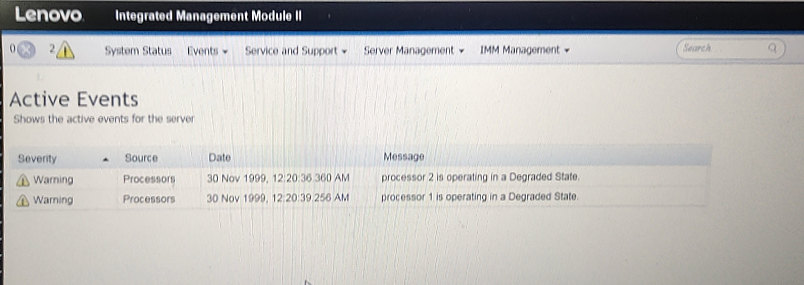

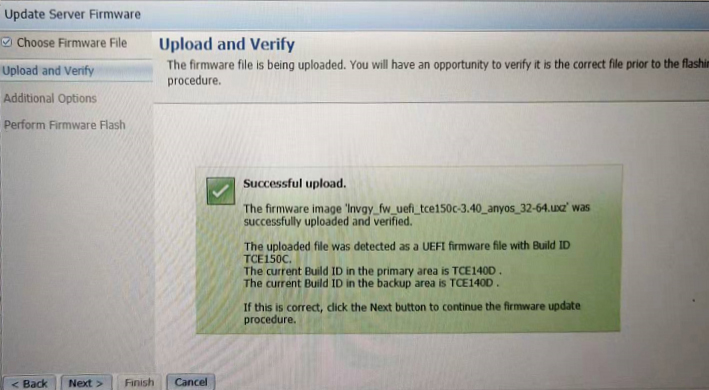
4, initially suspected that the microcode problem, so upgrade IMM and uefi microcode firmware version, restart the machine still exists CPU degradation alarm log;

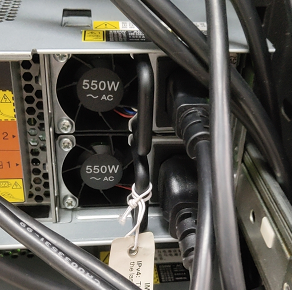
5, check the fan and power status are normal, unplug the power cord, remove all the power supply, wait 5 minutes and re-insert, restart the IMM still exists after the CPU degradation alarm;
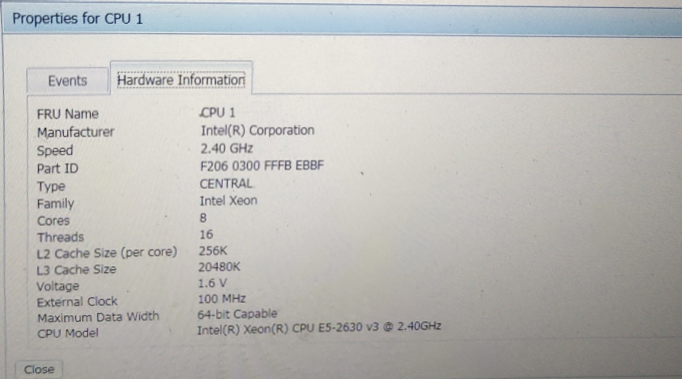
6, check the corresponding CPU, power supply model, to meet the normal conditions of use, to determine the power supply strategy there is a problem;

7, restart the server F1 enter bios;
F1 setup -->system settings
Operating Mode --> ChooseOperatingMode=CustomizeMode
F1 setup --> system settings --> Processor --> C-States=Disable
Processor --> Energy Saving Turbo=Disable
Processor --> Uncore Frequency Scaling=Enable
Power --> Active Energy Manager=Capping Disable
F1 setup -->system settings -->Power --> Platform Controlled Type=Maximum Performance
8, after the completion of the setup, restart the machine found that the CPU degradation disappeared, the machine all state normal.
Summary of experience
1, CPU degradation does not mean that the CPU is damaged, to judge from a number of aspects,
if the degradation occurs without any operation, the priority is to take the upgrade of the firmware version of the way;
such as other operations, can be from the perspective of the power supply fan as a priority failure to determine the conditions,
because the CPU's own power needs to be relative to the powersupply and temperature as a support.
2, this troubleshooting by changing the CPU and power supply redundancy mode and other operations, so that the CPU to get the maximum performance,
but this will increase the idle power of the CPU,can be implemented in the case of the first two operations are invalid.
For more information, please visit Antute's official website:www.antute.com.cn


 Your current position:Home > Technical Guide